IIS7 - Making IIS7 Manager UI Extension development easier - a little VS trick
When I started developing IIS7 Manager UI Extension modules, it took a little longer time for me to create the entire form manually. Robert's post helped me to some extent. But, still it took a little bit of more time till I figured out this little trick which I'm going to explain.
IIS7 UI modules uses nothing but System.Windows.Forms namespace. The UI stuff would come from your class which should be derived from Microsoft.Web.Management.Client.Win32.ModulePage defined in the DLL. So, how to make your Visual Studio to give you the designer view for your ModulePage class development which would have all your UI elements, their position, their event handlers (button click for example), et al.
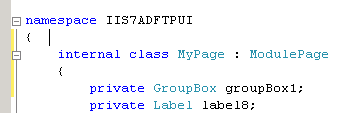 This is how your class would define your class deriving from ModulePage, and having all declarations of all your UI elements.
Now, if you right click on the file (MyPage.cs in my example) in the solution explorer, you would have an option to get to the designer - "View Designer". Click on that option. Or you can just double click on the MyPage.cs in the solution explorer to directly taking you to the designer view. Now, you would see the below:

This tells you why it can't display it. Now, comes the interesting part how to make it shown in the designer view. Now, go back to the designer view and change your class (MyPage in my example) to be derived from System.Windows.Forms.Form like below:
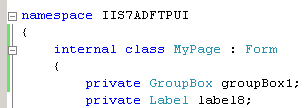 Now you should be able to see the designer view for your Module UI if you go to the Designer view in your Visual Studio.
Now, VS thinks that it is a Windows Form and it displays all your UI elements in the designer view.
Cool isn't it? Now, I'm sure your development time would be very less. You can just develop your IIS7 UI modules just as you develop any Windows Application using Visual Studio. You can drag and drop any control you need. For example : Drag a button, just double click on a button to get its button click event handler created.

But, you need to make sure that before your build your project, change your class to be derived from Microsoft.Web.Management.Client.Win32.ModulePage. If you just build the class deriving from Form, then you might end up in getting errors while opening IIS manager to view that module you have written.
Useful Links:
Creating a Simple UI Module Creating a Module Page for IIS7 Administration Tool Adding Configuration Functionality to IIS7 Admin Tool Extensions http://blogs.msdn.com/carlosag/archive/2006/08/12/ExtendingTreeView.aspx
Hope this helps!