PHP Installation using the Microsoft Web Platform Installer v2 Beta

Posted: Apr 01, 2009  10 comments  

Average Rating

Tags
IIS7
PHP
Web Application Gallery
Web PI

If you want to easily install PHP on Windows, you can use the newly released Microsoft Web Platform Installer v2 Beta to get the public community version of PHP ((VC6 x86 non thread safe installer build) on Windows XP/Vista/Server 2003/Server 2008/Win 7 with IIS and the Microsoft Web Platform. The Windows Installer for PHP also automatically configures IIS FastCGI as part of its setup.

To install PHP using Web Platform Installer:

  1. Install the Web Platform Installer v2 Beta if you don't have it already from here.
  2. Go to the Web Platform tab.
  3. Click on "Customize" on the Frameworks and Runtimes category.
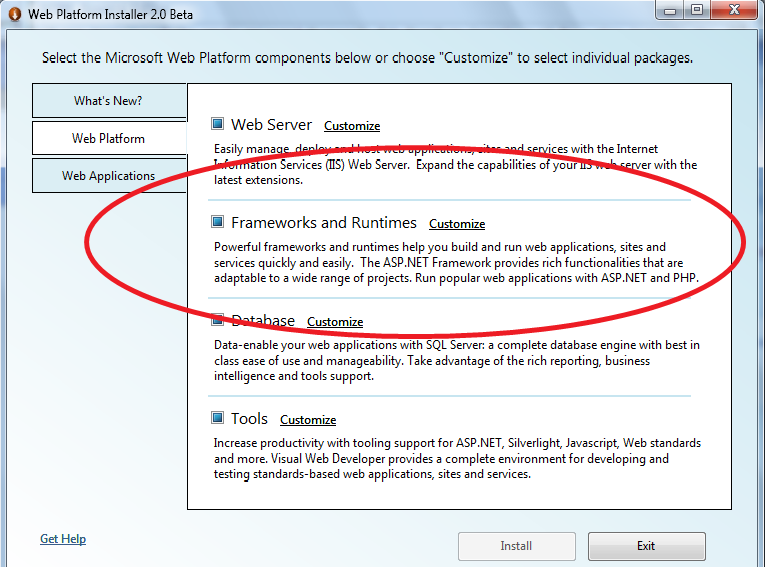
  4. Select PHP from the list of Frameworks and Runtimes.
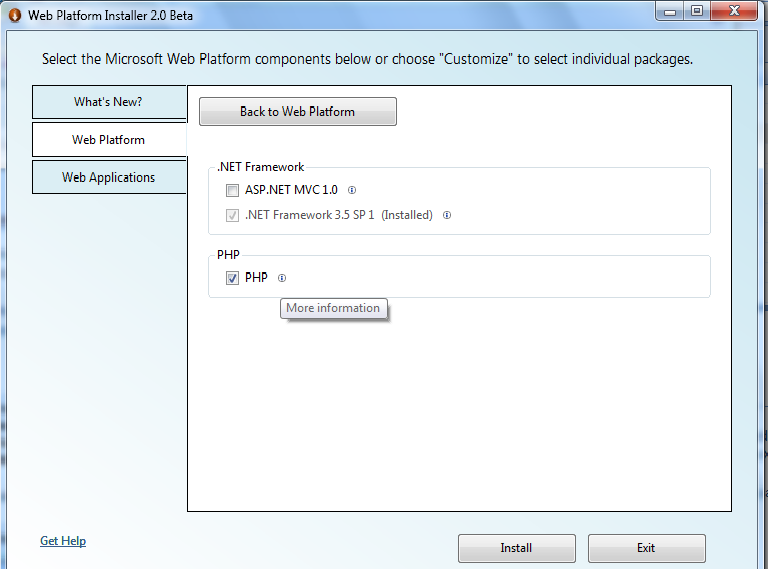

    (You can also click on the "i" icon to read more about PHP and get the version number and release date for the Version of PHP in the WebPI.)
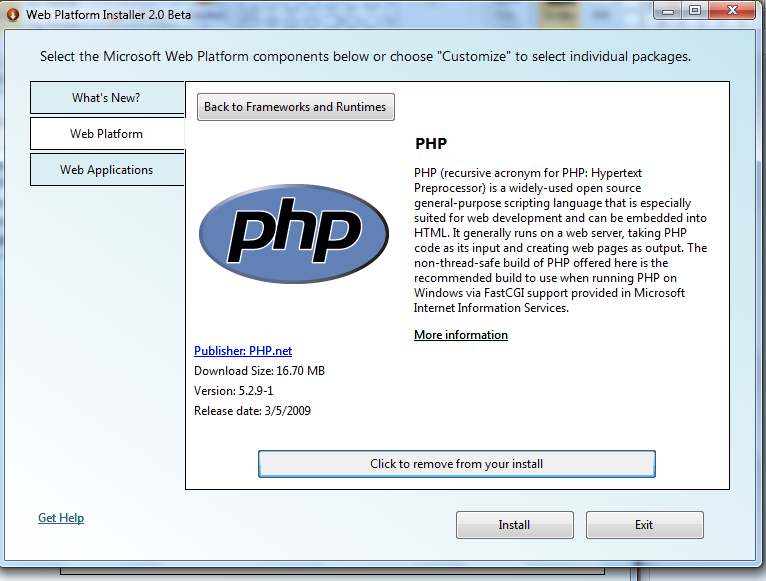

    Click Install.
  5. Go through the install experience...then you're done! PHP is installed.
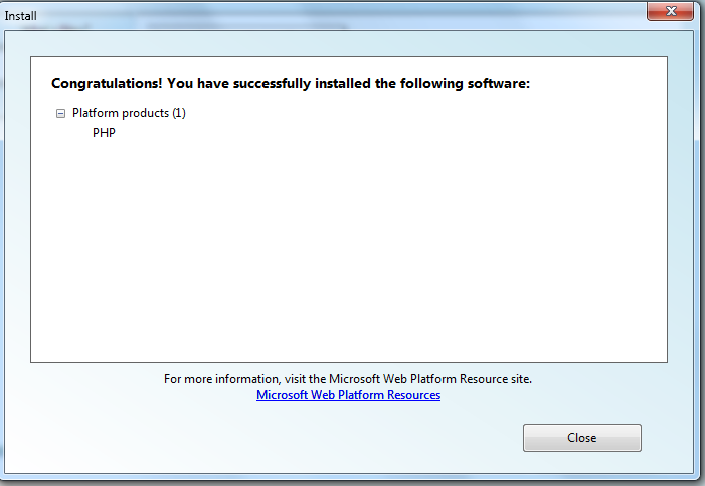
Web PI uses the latest version of the PHP 5.2.9-x Windows Installer to silently install PHP along with the following optional PHP components:

  1. MySQL extension: http://us3.php.net/mysql
  2. MySQL Improved extension: http://us3.php.net/mysqli
  3. SQL Server extension: http://us3.php.net/mysqli
  4. Multibyte string extension: http://us3.php.net/mysqli
  5. Image processing extension: http://us3.php.net/gd
  6. GetText extension: http://us3.php.net/gettext
  7. Client URL library: http://us3.php.net/curl
  8. Exchangeable Image information: http://us3.php.net/exif
  9. XML-RPC: http://us3.php.net/xmlrpc
  10. OpenSSL: http://us3.php.net/openssl

You can also go directly to the Windows on PHP community Web site to download PHP on Windows.

Note that if you install a Web App Gallery PHP application using the Web Platform Installer and do not have PHP installed on your computer, Web PI will automatically install PHP as a dependency of the application.

Useful links:

  • More about Web Platform Installer's new support for PHP and Web App Gallery applications here.
  • More about PHP support on IIS here.

Comments

  1. robtheailean
    April 1, 2009

    Wonderful.

    I used this new approach - and now my web sites will not display - and the working PHP installation I had, has been completely trashed.

    IIS6.0; wins 2003/64bit

  2. mailant
    April 2, 2009

    Hi, robtheailean: sorry to hear that your web sites not displaying. :-( It would be great if you could ping ksingla@microsoft.com and/or me at mailant@microsoft.com so that we can learn more about version of PHP you had on your box and check out the logs from WebPI.

    Thanks,

    Mai-lan

  3. robtheailean
    April 5, 2009

    Dear Anonynmous (says it all really...)

    The link I started with said "Install PHP on IIS" - did not say "Not on IIS 6" ; nor "Not on an existing install" [Why Not???]

    As the site is called"IIS.NET" - then one can be excused for NOT realisng it is an IIS 7.0 site only - you know we had IIS all the way back to 2.0...

    My original intent was to get WordPress up - and foolishly assumed (first rule - never assume!) - if I did it the "Microsoft Way" - I would avoid the many pitfalls I read about on seeveral PHP/Wordpress forums regarding the installation of these items.

  4. robtheailean
    April 5, 2009

    Dear Mailant,

    will do and thank you for your constructive response.

  5. robtheailean
    April 5, 2009

    Dear Mailant,

    will do and thank you for your constructive response.

  6. mailant
    April 8, 2009

    A couple things that are worth noting:

    1. The WebPI does work for both IIS 6 and IIS 7 -- we have a fastcgi component for IIS 6 that WebPI will install as part of the dependency for a PHP application. FastCGI ships in the box for IIS7. So we should work fine on IIS6 too.

    2. We are using the Windows installer for community PHP (http://windows.php.net) and work closely with John who runs that community PHP branch. We work together to figure out where bugs live and collaborate on making sure that we can fix problems for Windows users.

    3. We don't have uninstall right now in WebPI. :-( So we will lay down a version of PHP but we won't uninstall your existing version of PHP. Sometimes (perhaps in robtheailean's case) that can cause a problem -- hard to tell since environments can vary dramatically. One way to make sure that you don't run into problems is to manually uninstall the PHP version that you have right now (if you want to) and then run WebPI to install the versionn of latest stable branch of PHP. I understand that this might not be possible in some cases since you have apps that might depend on whatever version of PHP you run today. But it is a good way to make sure that your environment is "clean" for the installation using WebPI -- which will also make sure that your other PHP dependencies on Windows (like FastCGI) are there first and set up right.

    Hope that helps!

    Mai-lan

  7. mailant
    April 8, 2009

    By the way, yesterday we updated the PHP version in WebPI to install 5.2.9-2, which released yesterday on http://windows.php.net with a security patch. Our goal is to make sure that users can access the latest secure version of the latest stable build of PHP.

  8. mailant
    April 8, 2009

    Sorry, a few comments got stuck and didn't post. I wanted to circle around to answer them.

    Hi, Michael: Web PI v2 beta is exactly for that purpose of making it easy to get up and running with a Web app on a Windows computer. If you want to read more about WebPI v2 beta, you can check out this whitepaper at learn.iis.net/.../introducing-the-microsoft-web-platform-installer. I will send you a separate email to find out where you are having problems. Another approach is to post questions in the Web PI forum where you can get free help from our product team: forums.iis.net/1155.aspx. One thing I do want to call out is that we have been hearing that folks are having problems with installing from behind proxies. We are in the process of getting a new build ready for WebPI that fixes this problem. Because of how WebPI is built, you don't have to install a new version of WebPI -- your existing version of WebPI will auto-update with the latest build, which should be out in the next week or so.

    Hi, Paul: Can you give me some more information (or create a post in forums.iis.net/1155.aspx) about if you had a pre-existing version of PHP installed on your machine? WebPI keeps pretty good log files too so we'd like to look at those.

    For the anonymous question about graphics, I wanted to see if you meant that there were no graphics on the Web apps or no graphics for the details page for WebPI. You can also post your question to the Web PI forum (forums.iis.net/1155.aspx) if you want.

    Another resource is the Troubleshooting doc for WebPI at learn.iis.net/.../troubleshooting-problems-with-web-platform-installer-20.

    Hope that helps. Let me know if you have more questions or can share more info.

  9. mailant
    April 10, 2009

    Hi, Paul: You unfortunately ran into a problem that we saw for a few hours yesterday morning. Every time we update a package that gets installed by WebPI, we have to update a MD5 hash so that we can verify integrity in the source for download. For a few hours yesterday morning, the PHP install was down within WebPI because the PHP 5.2.9-2 package got updated with a library change and we didn't regenerate a MD5 hash. Ergo, PHP install failed with that error. We fixed it within a few hours (and are going to figure out a process to minimize this sort of thing in the future) but sounds like you were in that window. If you are up to it, can you try again? Should be working now. Also, if you have any questions, you can also post to our Web Platform Installer forum at forums.iis.net/1155.aspx.

    Mai-lan

  10. mailant
    May 1, 2009

    Hi, all: I wanted to pop back in and answer comments...one thing to note is that if you go into the Web PI user forum (forums.iis.net/1155.aspx), you can also post your questions there and a member of the community, feature team or our support will be able to answer more quickly.

    A couple of points:

    1. We were seeing a lot of proxy issues so we issued a refresh of WebPI. After we post a refresh, the next time you launch WebPI, you will be asked to upgrade your version. If you accept, you will get the latest build which fixes known proxy issues. If not, then you might see these again.

    2. We are seeing some cases where previous installations of PHP are causing some odd behaviors when 5.2.9-2 is installed. I would post your questions to forums.iis.net/1104.aspx.

    When you are running into problems with WebPI, the best thing to do is post the question to the forums with your log files. WebPI stores all the log files generated by the Windows Installer technology (which is what the PHP community builds to install on Windows) in a single directory. To look at the logs , open Windows Explorer and type the following into the address bar:%localappdata%\Microsoft\Web Platform Installer\logs

    In this directory and all its subdirectories you will find the installation logs of all the products WebPI installs. WebPI also displays a link to the log file that failed in its summary screen. I would recommend checking out those log files and copying the contents in a forum post. That makes it much easier to figure out what's going with your machine.

Submit a Comment